Address
304 North Cardinal
St. Dorchester Center, MA 02124
Work Hours
Monday to Friday: 7AM - 7PM
Weekend: 10AM - 5PM
Address
304 North Cardinal
St. Dorchester Center, MA 02124
Work Hours
Monday to Friday: 7AM - 7PM
Weekend: 10AM - 5PM

Two kids in two rooms means twice the guessing at bedtime. Split screen baby monitors solve that by putting both cribs on a single display, so you glance once and know who’s stirring. This roundup pulls together ten options that genuinely handle the dual-child setup, from a car camera that watches the back seat to home systems built for twins, with notes on where each one shines and where it falls short.

Kidsneed 7 inch HD 1080P Split Screen Baby Car Camera

Infant Optics DXR-8 PRO HD Video Baby Monitor
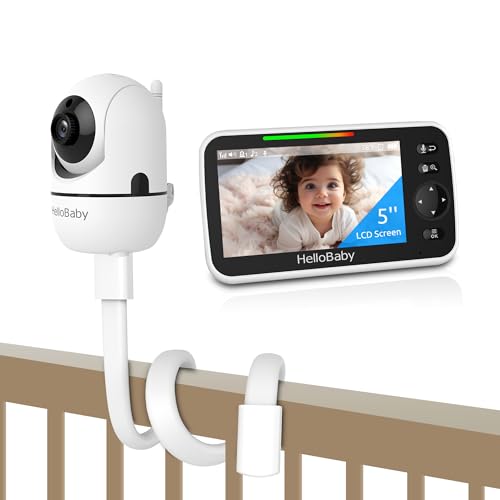
HelloBaby 5″ IPS Baby Monitor with Flexible Mount
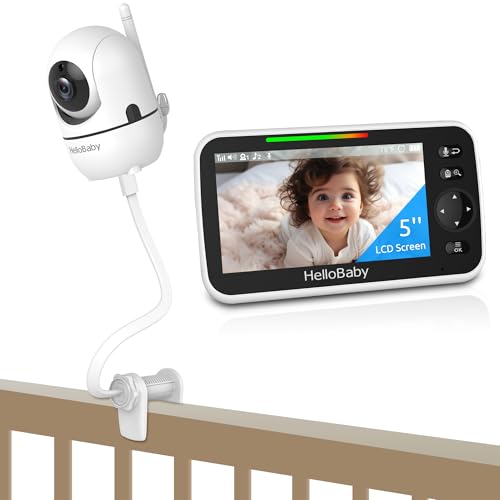
HelloBaby 5″ IPS Baby Monitor with Crib Clip

Derebir Flexible Baby Camera Monitor Mount
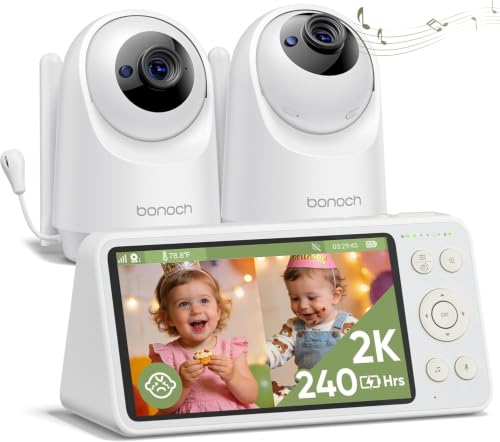
bonoch 2K 5.5″ Baby Monitor with 2 Cameras

jeeber 6.5″ Touchscreen 4MP WiFi Baby Monitor
Momcozy BM01 Add-on Camera Unit 1080P

PARIS RHÔNE 2K AI Baby Monitor with 2 Cameras

ARENTI C3 Kit 3MP WiFi 6 PTZ Baby Monitor
This one solves a problem most nursery monitors ignore: the back seat. Kidsneed ships a 7-inch HD display that pulls two camera feeds at once, each running at 1080P, so you can see a rear-facing infant seat and an older toddler in a booster without taking your eyes off the road.
The 150° wide-angle lens covers the entire back row, which matters more than the resolution number once the kids get bigger and start blocking narrower views. For families driving a minivan or large SUV daily, this fills a gap the home-only monitors above simply don’t address.
Two-child families who log real commute miles and want a single glance to confirm both kids are settled.
Drivers needing both a crib cam and a car cam should pair the Infant Optics DXR-8 PRO for the nursery and keep this Kidsneed unit in the vehicle.
The DXR-8 PRO is the rare monitor that treats audio quality with the same seriousness as video. Its patented Active Noise Reduction (ANR) actively filters out fans, air purifiers, and HVAC hum, so what reaches the parent unit is the baby, not the white-noise machine you deliberately bought.
The 5-inch HD display, pan-tilt-zoom lens, and interchangeable optical lens system make this a serious nursery tool for parents who prefer a closed WiFi connection. You get a hack-proof 2.4 GHz link and a user-replaceable battery, which means the monitor outlasts the typical two-year recharge-decline cycle.
Privacy-first parents with one child who want the cleanest possible audio and a swappable battery down the road.
Households with two separate rooms should reach for the bonoch 2K 5.5″ Baby Monitor with 2 Cameras, which ships with both cameras and a split-screen out of the box.
HelloBaby leans into flexibility here. The included twist mount lets you set the camera on a tabletop, clamp it to a wall bracket, or hang it above a crib, while the parent unit runs on a 30-hour battery that genuinely survives a full weekend trip without recharging.
The 5-inch IPS panel holds color and contrast at wide viewing angles, so you can glance at the screen from the kitchen counter without crouching in front of it. Remote 355° pan and 120° tilt cover a wide sweep of the nursery without entering the room.
Frequent travelers and grandparents hosting overnight visits who value a quick mount-anywhere setup.
You’d rather skip the mount and clip straight onto the crib rail: the HelloBaby Crib Clip version reviewed below does exactly that.
Where the previous HelloBaby unit mounts to furniture or walls, this one skips the hardware. A flexible gooseneck arm with a clip attaches directly to a crib rail, holding the overhead angle you actually want for a sleeping baby without tools or wall anchors.
The core electronics match the mount-based sibling, including the 30-hour battery, VOX (voice-activated) standby, and 2X zoom. The clip design simply trades the tabletop versatility for a faster setup in unfamiliar rooms, which matters when you’re staying somewhere for two nights and don’t want to drill holes.
Renter households and traveling parents who need a no-tools setup in any room they land in.
Homeowners wanting a permanent, drill-free ceiling-style view should consider the HelloBaby with Flexible Mount, which has a more stable tabletop and wall setup.
This isn’t a monitor, it’s a flexible mount that solves a problem shared by most monitors on the market: getting a good angle without buying a second piece of furniture. The Derebir stand accepts cameras from Momcozy, HelloBaby, Infant Optics, GoodBaby, ANMEATE, and many other brands, with a standard 1/4-inch clip that grips most nursery cameras.
The bendable arm wraps around crib rails or stands upright on a dresser, depending on how you shape it. For parents who already own a camera they like but hate the included stand, this is a quiet upgrade that fixes the actual daily annoyance: the angle.
Owners of an existing camera who want a better viewing angle without buying an entirely new monitor.
You need both a new mount and a new camera: the Momcozy BM01 Add-on Camera Unit gives you a fresh 1080P lens to pair with this Derebir stand.
Bonoch skips the entry-level resolution and ships a 2K sensor in each camera, paired with a 5.5-inch display that’s noticeably bigger than the 5-inch norm. Two cameras in the box make this one of the few split-screen-ready home monitors where you don’t pay extra for the second lens.
For two-child households, that camera math matters: most monitors here sell the second camera separately, which adds to the total. Bonoch’s firmware update for improved sound quality is a small detail that points to a brand that treats audio as an ongoing project, not a launch checkbox.
Two-child households that want both cameras out of the box without buying accessories separately.
You need phone-based remote viewing alongside a dedicated screen: the PARIS RHÔNE 2K AI Baby Monitor with 2 Cameras adds a companion app.
Jeeber builds the largest parent-unit display in this roundup at 6.5 inches and pairs it with a touchscreen interface that behaves like a phone. For grandparents or caregivers who never bonded with button-based monitors, this is the easiest transition you’ll find.
The 4MP camera pushes past standard 1080P and ships with app control alongside the dedicated monitor, which lets multiple family members check the nursery from different devices. The IPS panel keeps the picture clean from side angles, which matters when several people crowd around the parent unit.
Multi-caregiver households with grandparents who want the simplest possible interaction with the monitor.
You prefer zero-WiFi simplicity: the bonoch 2K 5.5″ Baby Monitor with 2 Cameras offers similar dual-room coverage on a closed link.
The BM01 add-on camera only makes sense if you already own the matching Momcozy monitor, but in that case it unlocks a useful capability: the parent unit pairs with up to four cameras, and the screen switches into a split-view layout once a second camera joins the network.
Pairing takes roughly five seconds, which means moving a camera between rooms for nap-time rotations doesn’t require a tech support call. The 1080P sensor matches the resolution of the parent unit, so the second feed looks consistent rather than noticeably softer.
Existing Momcozy BM01 owners who want a second-room or second-child camera without replacing the parent unit.
Shoppers starting from scratch should consider the bonoch 2K 5.5″ Baby Monitor with 2 Cameras, which includes two cameras in the box.
PARIS RHÔNE’s pitch is the hybrid approach: a dedicated 5-inch handheld screen for at-home caregivers and a separate phone app for remote viewing, both running on the same camera pair. That dual access matters when one parent is at the office and the other is in the kitchen.
The 2K resolution on each camera feeds a true split-screen on the parent unit, and the AI features handle motion and sound detection without flooding the app with false alarms. The encrypted 2.4 GHz link between cameras and handheld keeps the local feed hack-proof while the app uses a separate secured connection.
Working parents who split childcare between home caregivers and remote check-ins during the workday.
You want the simplest possible setup: the bonoch 2K 5.5″ Baby Monitor with 2 Cameras delivers dual-camera coverage without app pairing.
The ARENTI C3 Kit leans on WiFi 6 to push a 3MP feed from a pan-tilt-zoom camera to a wireless 5-inch display, plus a companion app. PTZ (pan, tilt, zoom) gives you a single camera that sweeps a full room rather than a fixed corner view, which can matter in oddly shaped nurseries.
The infrared night vision uses 940nm LEDs, which produce light the human eye can’t see, so the nursery stays visually dark during a midnight check. Cry and motion alerts ping the phone when something changes, giving caregivers a heads-up without staring at the screen.
Caregivers in larger homes with thick walls or crowded WiFi networks who benefit from WiFi 6 stability.
You need two cameras from day one: the PARIS RHÔNE 2K AI Baby Monitor with 2 Cameras ships a matched pair out of the box.
The first decision is where the monitor will actually live. A car-only camera like the Kidsneed unit does its job brilliantly on the road but contributes nothing at home, while the bonoch and PARIS RHÔNE kits ship with two cameras ready for separate rooms. Single-camera systems like the Infant Optics DXR-8 PRO still work, but the second room becomes an add-on purchase.
Closed-link versus WiFi shapes the daily experience more than most shoppers expect. Closed 2.4 GHz systems pair in seconds, never ask for a password, and avoid the app fatigue that comes with rebooting a router. WiFi systems add app control and remote viewing, at the cost of occasional connectivity troubleshooting and the security questions a connected device invites.
Display size and battery life quietly determine whether you actually enjoy using the monitor. A 5-inch screen works for most nurseries; a 6.5-inch touchscreen like the jeeber makes life easier for grandparents who never bonded with button menus. Battery life matters most for travel: the HelloBaby units’ 30-hour runtime genuinely outlasts a weekend visit.
The most common mistake is buying a single-camera monitor and assuming the second camera is included. Most systems in this roundup ship with one lens, and the second-camera add-on can quietly double the total cost. Check the box contents before you commit.
Another trap is overestimating WiFi range. A monitor that streams fine in a studio apartment can drop frames in a two-story home with masonry walls. Closed-link systems avoid this entirely, while WiFi units may need a mesh network to perform reliably in larger spaces.
Premium models in this category earn their higher tier through resolution, hybrid connectivity, and active noise filtering. A 2K or 3MP sensor captures the difference between a sleeping baby and a slightly awake one, which sounds small until you’re staring at the screen at 3 a.m.
Hybrid systems that pair a dedicated parent unit with a phone app cost more because they run two parallel connection paths with separate encryption. For working parents, that dual access often justifies the price difference over a single-mode closed-link monitor.
Yes, many split screen options use a closed 2.4 GHz connection that pairs directly between the cameras and the parent unit. These systems avoid the security and connectivity questions that come with WiFi-dependent models.
Most monitors support add-on cameras from the same brand, though compatibility varies. The Momcozy BM01 add-on pairs with the matching parent unit, while the HelloBaby systems work with HelloBaby-branded accessory cameras only.
Higher resolution helps when you need to read small details like breathing patterns, but 1080P is generally enough for most nurseries. The jump to 2K or 3MP matters more in larger rooms or when zooming in on a specific area.
Pan-tilt-zoom (PTZ) lets a single camera cover a wider area by rotating remotely. This works well in L-shaped or open-concept nurseries where a fixed-angle camera would miss part of the room.
WiFi monitors from established manufacturers use encrypted connections and regular firmware updates to reduce hacking risk. Closed-link systems sidestep the question entirely by never touching your home network.
The best split screen baby monitor is the one that matches your home layout, your travel habits, and your comfort level with connected devices. Two-child households get the most obvious value from kits that ship with both cameras, while single-child families often do fine with a closed-link monitor and an optional add-on later. Start with where the monitor will live and how you’ll actually use it, and the right pick tends to fall into place.