Address
304 North Cardinal
St. Dorchester Center, MA 02124
Work Hours
Monday to Friday: 7AM - 7PM
Weekend: 10AM - 5PM
Address
304 North Cardinal
St. Dorchester Center, MA 02124
Work Hours
Monday to Friday: 7AM - 7PM
Weekend: 10AM - 5PM

Remote work, hybrid offices, and creator-led streams have turned video conference tools into daily essentials. The right setup depends on whether you’re running a one-person desk, leading a town hall, or streaming a Sunday service to hundreds. After sorting through dozens of options, these ten cover the most useful scenarios for 2026. Each one solves a real problem, from cramped home offices to mid-size conference rooms where everyone needs to be seen and heard.
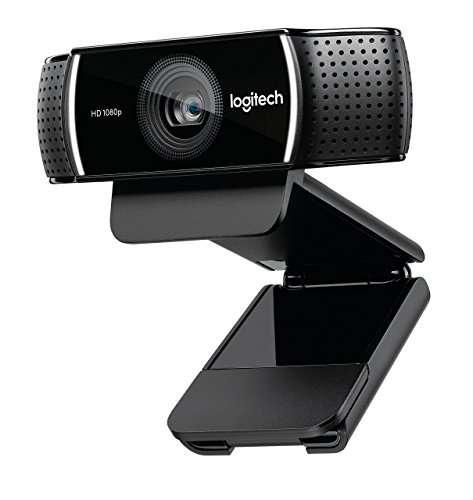
Logitech 1080p Pro Stream Webcam (Renewed)
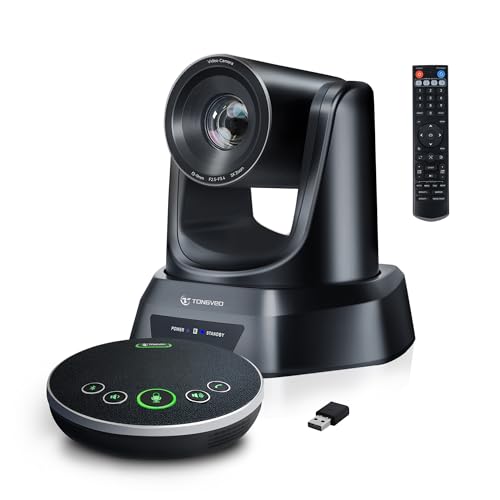
TONGVEO AI Auto-Tracking PTZ Camera with Bluetooth Mics

4K USB Document Camera 8MP Visualiser A3

KanDao Meeting Pro 360° Conference Camera

IPEVO DO-CAM Creator’s Edition 8MP

OBSBOT Tiny SE 1080P AI Tracking Webcam
TONGVEO 4K 20X PTZ System with Speakerphone
TONGVEO 4K 20X PTZ Camera for Conference Rooms

KanDao Meeting PRO 2 4K HDR with SmartNote
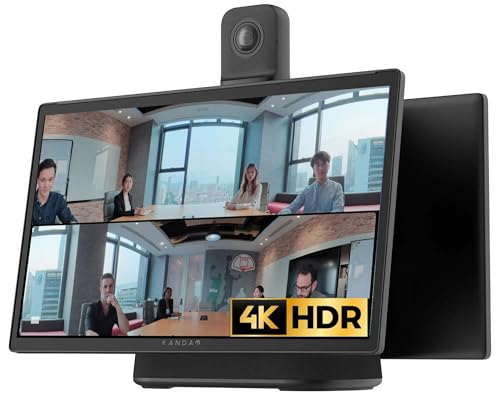
KanDao Meeting Ultra 5-in-One System
The Logitech C920-class webcam remains a familiar sight on home desks for good reason, and this renewed edition brings the same 1080p sensor at a friendlier price point. It clips easily to a monitor and connects through a standard USB port, so setup takes seconds for anyone who already runs Zoom, Teams, or Google Meet on their laptop.
For solo remote workers running one-on-one calls or weekly check-ins, the picture quality holds its own against newer budget options. You trade extras like AI tracking or high frame rates, but you gain a dependable plug-and-work camera without overthinking it.
Solo remote workers running daily video calls from a quiet home office and looking for a low-cost refresh.
The KanDao Meeting Pro 360-degree Video Conference Camera suits small teams that need 360° coverage in a shared room rather than a single-desk setup.
TONGVEO brings a step up from desk webcams with a true PTZ (pan, tilt, zoom) conference camera built around AI speaker tracking. The 3X optical zoom and 93° wide-angle lens keep multiple people in frame, while the included Bluetooth microphones handle audio capture from across a small table.
Small teams running hybrid standups and teachers leading hybrid lessons get the most from this kit. The unit sits on a table or mounts to a wall, and the 1080p output at 60 frames per second gives smoother motion than typical 30fps webcams, which matters when a presenter walks across the room.
Small teams and classroom instructors who need automatic framing without hiring a camera operator.
The OBSBOT Tiny SE 1080P AI Tracking Webcam suits solo creators who want compact AI tracking on a desktop rather than a room-scale PTZ rig.
The kitchbai visualiser turns any desk into a demonstration stage, showing printed worksheets, circuit boards, or sketchpads in sharp 4K detail. The adjustable arm folds flat for storage between lessons, and the three-level LED light tackles dim classrooms without flooding the room with glare.
Teachers running live demos and remote lecturers who want students to see physical objects benefit most. Dual built-in microphones pick up the presenter’s voice, and image inversion flips documents right-side-up when working under the camera.
Teachers and trainers who need to show physical materials to remote or hybrid classes on a regular basis.
The IPEVO DO-CAM Creator’s Edition 8MP suits educators who frequently switch between showing documents and their own face during the same session.
The original KanDao Meeting Pro set the stage for all-in-one huddle room cameras, and it still earns a place on shortlists for small meeting spaces. Dual wide-angle lenses stitch together a full 360° view, while eight omnidirectional microphones capture voices from anywhere around the table.
Huddle rooms running four to six person meetings get a clean, cable-free setup since the camera doubles as a speaker and mic array. AI face and voice tracking follow whoever is speaking, and you can connect via Wi-Fi, HDMI, or USB depending on the room’s existing display gear.
Teams running frequent huddle-room meetings who want a single device replacing camera, mic, and speaker.
The KanDao Meeting PRO 2 4K HDR with SmartNote suits distributed teams that also need AI-powered meeting notes and translations.
The IPEVO DO-CAM Creator’s Edition flips between document camera and face camera with a twist of the head, which is genuinely useful for hybrid educators who alternate between showing pages and chatting with students. The 8MP Sony sensor captures Ultra HD stills and clean video for either mode.
Remote educators and tutors running one-on-one or small-group lessons get an adaptable single tool instead of two separate devices. You may find the compact build travels well between home and classroom, though the stand works best on a stable flat surface.
Hybrid educators and trainers who frequently switch between showing materials and speaking to a class.
The 4K USB Document Camera 8MP Visualiser A3 fits teachers who need a larger capture area and built-in LED lighting for printed materials.
The Tiny SE sits at the crossroads of webcam and PTZ camera, delivering 1080p at a smooth 100 frames per second with onboard AI tracking. The compact gimbal base rotates to follow your face as you move across a desk, which matters for fitness instructors, presenters, and live streamers who pace during recordings.
Creators running solo streams or interactive demos find the higher frame rate noticeably sharper than typical 30fps webcams, especially when motion kicks in. Compared to the Logitech 1080p Pro Stream Webcam earlier on this list, this one trades plug-and-play simplicity for intelligent framing.
Solo creators, fitness coaches, and presenters who move around during streams and need auto-tracking on a desk.
The TONGVEO 4K 20X PTZ System with Speakerphone serves mid-size venues that need long-range optical zoom and a full-room speakerphone.
TONGVEO pairs a 4K PTZ camera with a Bluetooth conference speakerphone, creating one box that handles video, audio capture, and playback for medium-sized rooms. The 20X optical zoom reaches across a boardroom, while AI tracking keeps whoever is speaking in frame without a remote operator.
Mid-size venues and growing teams that have outgrown huddle-room gear appreciate the all-in-one approach. PoE (Power over Ethernet) support simplifies cabling by running power and data through a single network cable, which helps when the camera mounts on a ceiling or back wall.
Mid-size venues, conference rooms, and churches needing one integrated camera-and-speaker solution.
The TONGVEO 4K 20X PTZ Camera for Conference Rooms works better for installs that already have a separate audio system in place.
The TONGVEO 4K PTZ camera is built for fixed installations in larger spaces, offering the same 20X optical zoom and AI tracking as the speakerphone-equipped version, but without bundled audio. Pastors, educators, and AV integrators get a camera that drops into an existing sound system cleanly.
Church sanctuaries and lecture halls benefit most from the camera’s ability to capture detail up to 80 feet from the lens. PoE keeps cabling tidy, and HDMI, USB 3.0, and LAN outputs cover everything from streaming encoders to room PCs.
Churches, lecture halls, and auditoriums running hybrid services or classes who already have dedicated audio.
The TONGVEO 4K 20X PTZ System with Speakerphone makes more sense for rooms needing an all-in-one video and audio package.
The Meeting PRO 2 builds on the original Meeting Pro with a 4K HDR sensor and the SmartNote assistant that records, transcribes, and summarizes meetings in real time. Distributed teams get more than a camera: they get a searchable archive of every conversation in the languages that come up most.
Global teams that juggle multilingual calls benefit from the real-time translation feature, while project leads appreciate automatic recaps that capture decisions and action items. Noise-canceling mics keep cross-talk out of recordings, and integration with Zoom, Teams, and other platforms means it drops into most existing workflows.
Distributed and multilingual teams that need searchable meeting records and translation as part of their workflow.
The KanDao Meeting Pro 360° Conference Camera fits smaller teams that want 360° coverage without the AI meeting-assistant features.
The KanDao Meeting Ultra tops the lineup as a full meeting-room hub, combining dual 4K HDR 360° cameras, a 15.6-inch touchscreen, built-in microphones, and Hi-Fi speakers in a single console. The touchscreen means a meeting can start without anyone fumbling with cables or a remote control.
Executive boardrooms and large team spaces get a turnkey system that replaces a stack of separate AV gear. AI smart zooming frames the active speaker automatically across the wide camera array, and the built-in computer handles the meeting software so the room doesn’t depend on a laptop being present.
Executive boardrooms and large meeting spaces that need a polished, all-in-one conferencing hub.
The KanDao Meeting PRO 2 4K HDR with SmartNote fits teams that already have a room display and only need the camera and assistant.
Room size drives most decisions in this category. Solo remote workers get by with a simple 1080p webcam like the Logitech 1080p Pro Stream Webcam, while small huddle rooms need wider coverage such as the KanDao Meeting Pro 360° Conference Camera. Venues seating more than a dozen people usually require PTZ reach, which is where 20X optical zoom on the TONGVEO systems earns its keep.
Connection type matters as much as image quality. USB-only cameras plug straight into a laptop for ad-hoc calls, while HDMI, LAN, and PoE outputs support fixed installations where a single cable run keeps the room tidy. AI features like auto-tracking reduce the need for a camera operator, and built-in speakerphones remove one more piece of gear from the conference table.
Software compatibility rounds out the decision. Most cameras here work with Zoom, Microsoft Teams, and Google Meet out of the box, but devices with onboard computers like the KanDao Meeting Ultra 5-in-One System can run meeting apps directly. Match the camera’s strengths to your room’s most common meeting style, whether that’s a quick standup, a long client demo, or a recorded training session.
The most common mistake is buying a high-end PTZ camera for a single-person desk, then finding the auto-tracking fights against a stationary user. Conversely, a basic webcam in a six-person meeting room leaves half the team cropped out. Match camera capability to room scale before chasing resolution numbers.
Another trap is ignoring room acoustics. Even the best 4K camera produces a frustrating meeting when voices echo or background noise drowns out the speaker. Cameras with built-in microphone arrays, like the KanDao Meeting Pro 360° Conference Camera, help in standard offices, while larger rooms often need ceiling mics for clean audio.
Higher-tier models buy optical zoom, 4K resolution, AI meeting assistants, and PoE installation-friendly hardware. For a small business running weekly internal calls, that upgrade rarely justifies itself. For venues streaming services, recording lectures, or capturing detailed product demos, the jump from 1080p to 4K and from digital to optical zoom makes a noticeable difference in production quality.
Most video conferencing platforms compress video to 1080p or lower during calls, so a sharp 1080p camera often looks identical to 4K in standard meetings. The 4K advantage shows up in recorded content, cropped close-ups, and large room displays where detail matters.
A single 360° camera like the KanDao Meeting Pro can cover small huddle rooms effectively, but medium and large rooms often benefit from a PTZ camera with optical zoom so the active speaker fills the frame. Matching camera reach to seating distance is the deciding factor.
For most meetings, yes. AI auto-tracking follows the active speaker reliably without a remote control. The exception is scripted broadcasts or multi-camera productions where intentional framing matters more than reactive tracking.
In rooms used by multiple people who aren’t tech-savvy, yes. A touchscreen-based system like the KanDao Meeting Ultra reduces setup friction and removes dependency on a specific laptop. Smaller teams with a tech lead on hand often do fine with separate components.
Very important. Most meeting complaints stem from poor audio rather than poor video. Cameras with built-in multi-mic arrays or paired speakerphones make a bigger difference to call clarity than a small jump in resolution.
The right video conference tool comes down to room size, call frequency, and how many moving parts your team is willing to manage. Solo workers and small teams get excellent value from simpler webcams, while growing companies and shared spaces benefit from 360° or PTZ systems that handle framing automatically. Pick the camera that matches your most common meeting, and your setup will quietly do its job call after call.